


Bernard Jensen Iridology Chart PDF
Bernard Jensen Iridology Chart PDF: UK Download Guidance and Digital Iridology Chart Options
MAIKONG FREE IRIDOLOGY CHART
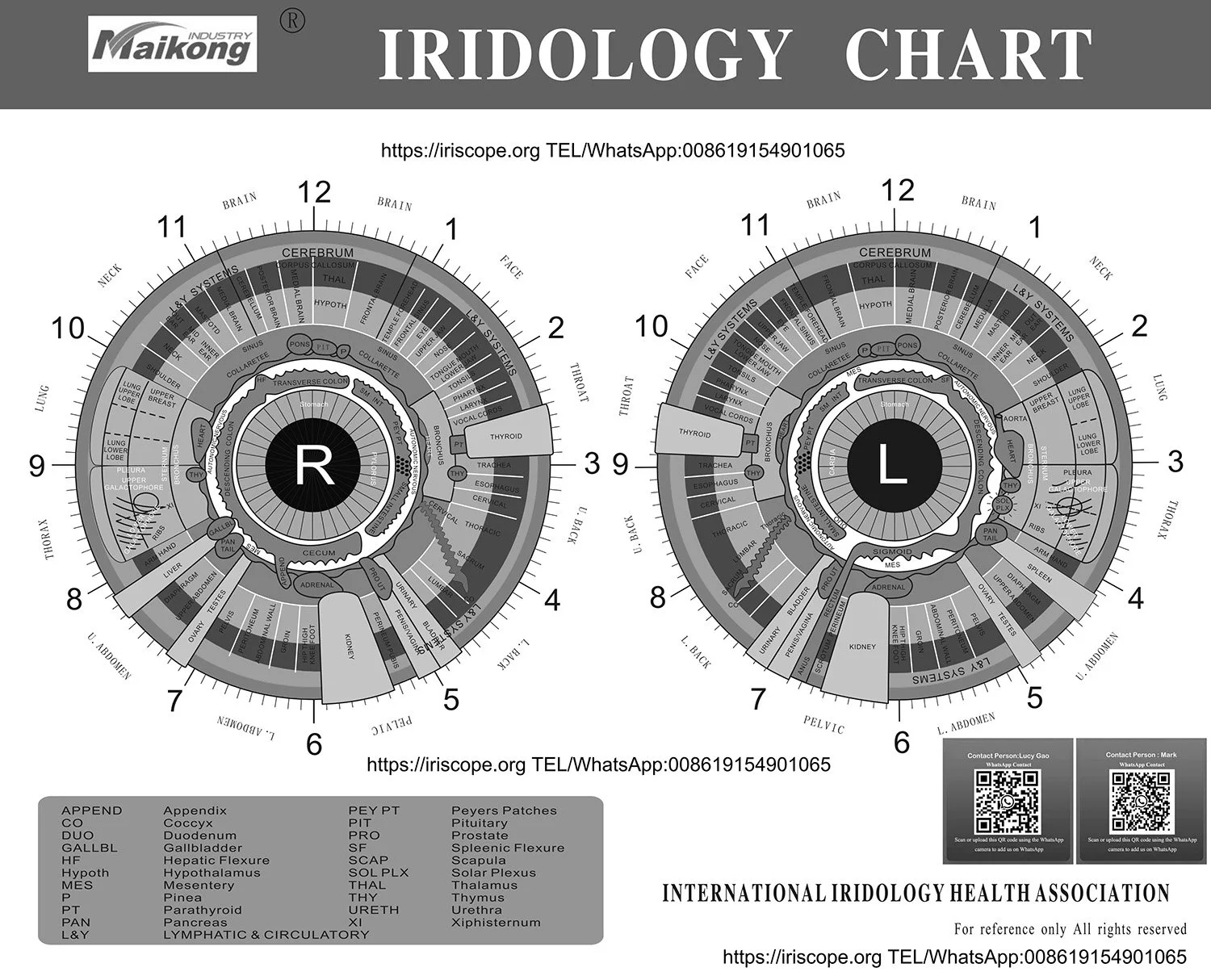
A digital _bernard jensen iridology chart pdf_ serves as an educational reference mapping iris sectors to reflex zones throughout the human body. Practitioners and students use this layout to examine iris fibre structure, pigment distribution, and constitutional markers alongside modern digital imaging tools.
Authentic study requires clear sector definition, legitimate distribution channels, and compliant wellness documentation. Pairing high-resolution digital references with specialised optical hardware supports structured lifestyle observation across educational and natural health settings.
Principles of the Bernard Jensen Iris Chart
Developed through extensive clinical observation by Dr Bernard Jensen, this topographical model divides the anterior surface of the iris into concentric rings and radial segments. The layout reflects traditional European reflexology and early observations by Ignaz von Peczely, organising reflex projections from the pupillary boundary outwards to the ciliary margin.
Each sector corresponds to bodily areas, distinguishing between the bilateral projections of the left and right irises. In traditional iridology education, these zones guide observational dialogue rather than providing clinical verdicts.
- Pupillary border and stomach ring representing foundational digestive vitality.
- Inner ciliary zone mapping the intestinal tract and autonomic nerve wreath.
- Intermediate radial zones projecting glandular, muscular, and spinal relationships.
- Outer ciliary zones reflecting lymphatic circulation, skin surface, and elimination pathways.
- Bilateral distribution allocating symmetrical organs, such as kidneys and lungs, to respective sides.
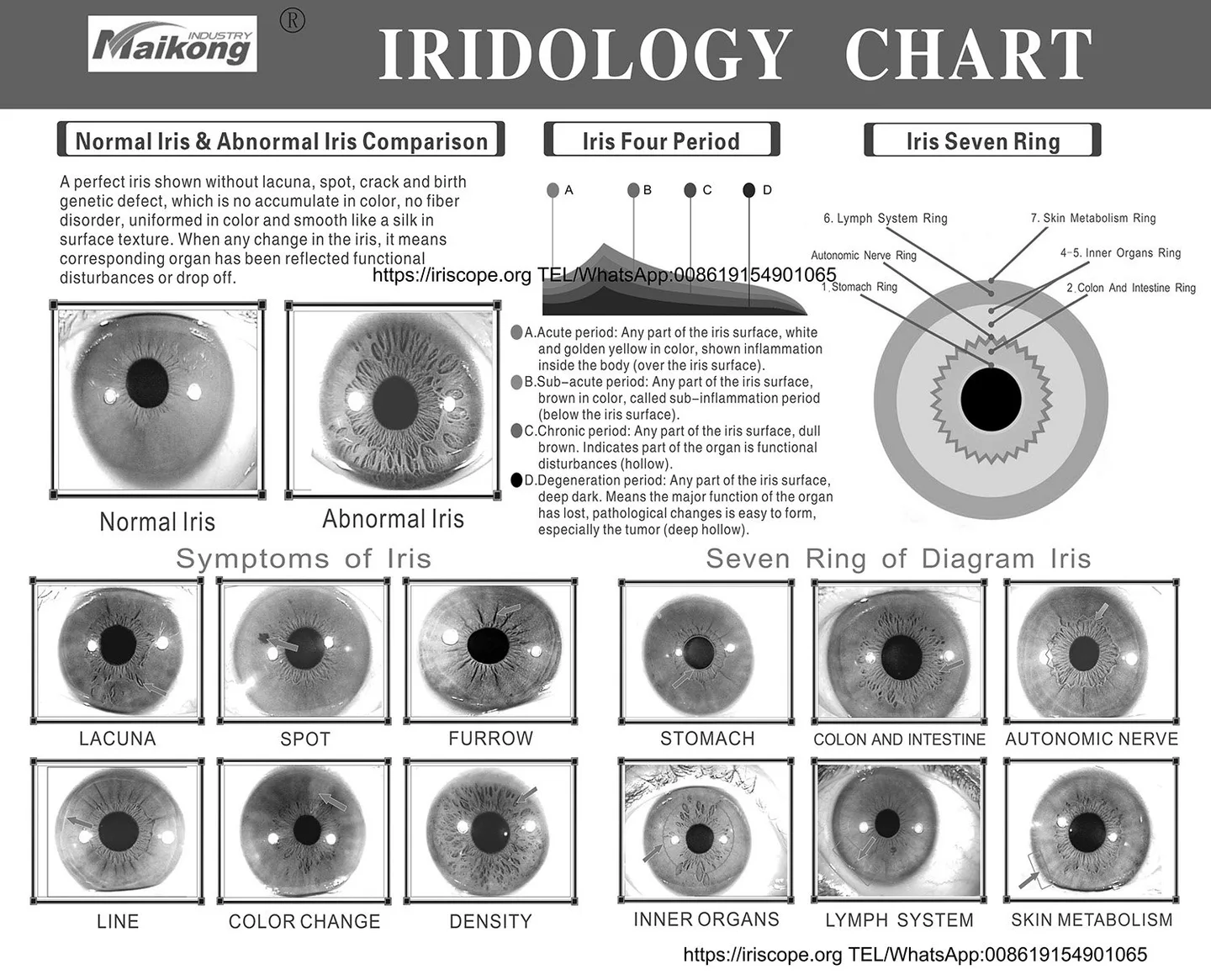
Practitioners evaluate variations in fibre density, shading, and structural openings as indicators of constitutional resilience. These observations form part of holistic lifestyle assessments within educational, anti-aging, and functional wellness environments.
What to Check Before Downloading an Iridology Chart PDF
Locating a dependable digital document requires verifying technical clarity and intellectual property rights before incorporating files into consultation records. Low-grade scans frequently blur vital sector borders and degree lines, creating interpretive confusion during study sessions.
Files distributed across public domains often exhibit skewed aspect ratios or missing sector annotations. Selecting legitimate educational publications preserves geometric accuracy, which is essential when aligning visual iris records against chart overlays.
Confirm that any digital PDF chart retains vector sharpness at high magnification, clearly displays 360-degree increments, and is licensed for personal educational use or professional clinic reference.
Users must request format availability directly from official distributors rather than relying on unverified third-party repositories. Reputable sources provide clear documentation concerning copyright status and high-definition raster or vector reproduction.
Pairing a Digital Reference Chart with an Iriscope Camera
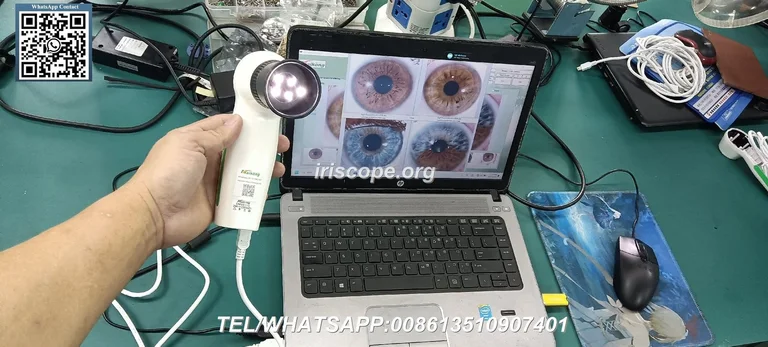
Modern natural wellness consultations combine static reference charts with live digital image capture. Using a dedicated iridology camera allows practitioners to display high-resolution iris photography alongside a reference chart on a single workstation screen.
Digital capture reduces the lighting inconsistencies and client fatigue associated with handheld magnifying lenses and torches. High-resolution sensors record subtle fibre patterns, crypts, and pigmentation, allowing structured visual reviews over time.
Digital Optical Workflow
- Consistent LED illumination maintains balanced white levels across iris sectors.
- Side-by-side computer displays simplify sector comparison against reference charts.
- Date-stamped visual records support longitudinal wellness and lifestyle tracking.
Manual Magnifier Workflow
- Handheld lights introduce glare and variable shadows across the pupillary margin.
- Transitory optical viewing prevents precise historical comparison across sessions.
- Client fatigue increases during extended manual focal adjustments.
MAIKONG Professional USB Iriscope Specifications
Digital iris inspection demands calibrated optical hardware capable of revealing delicate structural textures. The MAIKONG GY-9822U system pairs high-resolution optical hardware with intuitive controls designed for professional consultation environments.
The device connects directly to desktop or laptop hardware via USB, drawing power through the interface cable without requiring external transformers. An integrated handle dial provides tactile control over lighting intensity and focal depth.
Optical Lens30X Iris LensDelivers uniform magnification across both irises.IlluminationIntegrated LED ArraySurrounds the lens to minimise direct reflective glare.ClassificationClass I DeviceSupplied under manufacturer CE declarations for wellness use.Package ExtrasPrinted ReferenceSupplied with one printed physical iridology chart.
SpecificationHardware FeatureFunctional BenefitSensor Type12MP CCD SensorCaptures delicate structural fibre detail cleanly.
Hardware packages include a protective PU leather carry case, lens cover, 1.5-metre USB interface cable, user instructions, and software installation media. Dual-lens compatibility also accommodates optional skin and hair inspection optics.
Software Integration and Operating System Compatibility
Software environments must manage digital iris captures efficiently while maintaining structured records. The MAIKONG 2026 software suite integrates image storage, sector overlay analysis, and customer history management within a unified interface.
Compatibility spans contemporary and legacy computing environments, supporting both Windows and Apple operating platforms. Linux, Android, and Unix configurations are not supported.
macOSmacOS 10.14 to 15Supports Mojave through Sequoia releases natively.Mobile & LinuxUnsupportedNot compatible with Android, Linux, or Unix environments.
| Platform | Version Support | System Architecture | |
| Windows OS | Windows 2000 to 11 | Compatible with both 32-bit and 64-bit systems. | |
The integrated software interface provides built-in reference grid overlays that assist practitioners when correlating visual findings with classical chart layouts during consultations.


Software Features for Client Education and Documentation
The MAIKONG software suite provides comprehensive consultation management tools alongside imaging functions. Visualisations assist clients in understanding personal lifestyle patterns and historical wellness progress over multiple visits.
Data security routines protect practitioner records through automated archive creation and quick restoration protocols. Multi-language architecture permits global deployment across 17 distinct linguistic settings.
Client Records Management
Maintains client histories, dates, personal indicators, and comparative historical photography within an encrypted local directory structure.
3D Surface and Texture Views
Renders structural depth maps and negative-contrast views to clarify fibre separations, structural crypts, and autonomic nerve rings.
Customisable Reporting
Generates client-facing lifestyle summaries incorporating practitioner notes, dietary recommendations, and educational references.
For organisations requiring corporate branding, MAIKONG provides OEM customisation, allowing software logos, specific product catalogues, and regional languages to be integrated seamlessly.
Software Setup and Hardware Installation Steps
Setting up the MAIKONG iriscope workstation requires following a straightforward hardware recognition procedure. Completing these sequential steps ensures correct driver registration and secure dongle authentication before operating the camera.
Prior to beginning installation on machines with existing webcams, check that internal cameras do not create USB video device conflicts within the operating system device manager.
- Insert the provided 4GB USB installation key into an available high-speed USB port on the workstation.
- Double-click the installation executable file and follow the on-screen installation prompts to completion.
- Disable integrated internal webcams via the operating system Device Manager if video conflict occurs.
- Unplug the installer storage key and insert the USB camera connector firmly into the USB port.
- Insert the metal USB security encryption dongle into a separate USB socket to enable application access.
- Double-click the desktop application shortcut to launch the camera control environment.
- Confirm live sensor video feed and adjust illumination using the handle dial to finalise calibration.
Warranty Coverage, Maintenance, and After-Sales Policies
MAIKONG provides structured after-sales technical support for all manufactured hardware systems. Standard manufacturer documentation states an operating design life of five to ten years for electronic imaging assemblies under normal clinical use.
Warranty coverage applies to manufacturing defects and material malfunctions under normal operating conditions. Internal manufacturer documentation notes a warranty period of one year, with certain service agreements specifying up to thirteen months from the purchase date.
Warranty maintenance covers manufacturing malfunctions but excludes accidental drops, liquid ingress, user tampering, force majeure events, or consequential commercial losses. Units requiring component service are returned to the factory facility.
In the event of physical transit damage upon initial delivery, recipients must notify the freight courier immediately and inform MAIKONG technical support. The customer service team responds to operational enquiries and technical requests within 24 hours via Contact channels.
Reseller, Training Academy, and OEM Supply Partnerships
Operating as an established manufacturer with two decades of optical production experience, MAIKONG collaborates with training academies, clinics, and equipment distributors throughout the United Kingdom and Europe. Production facilities operate under ISO9000 quality management standards, holding CE conformity documentation.
Resellers benefit from substantial product inventory maintained in regional hubs, facilitating reliable order dispatch. Comprehensive white-label options encompass outer shell mould design, casing colours, brand packaging, and custom software feature integration.
Become an Authorised UK Equipment Distributor
Establish direct manufacturing supply agreements for professional iriscope devices, charting systems, and custom software packages tailored to your commercial market.
Frequently Asked Questions
Where can I find a bernard jensen iridology chart pdf?
Verified digital files should be requested directly through the bernard jensen iridology chart pdf information page to confirm copyright licensing and high-resolution availability. Official training organisations and authorised natural wellness publishers also supply legitimate study copies.
Is the PDF free to download?
Licensing terms vary depending on the publisher and educational body holding publication rights. While introductory study diagrams may be distributed freely for educational purposes, comprehensive high-definition charts typically require an authorised licence or purchase.
Can I print an iridology chart for training?
High-resolution vector or raster files can be printed for personal training, student revision, and consultation reference if permitted by the document licence. Clear laminating helps preserve sector boundary lines and colour fidelity during clinical practice.
Can a PDF chart be used with a MAIKONG iriscope camera?
Practitioners routinely display digital PDF reference charts on a secondary monitor or import compatible chart overlays into analysis software alongside live iris captures. This workflow allows direct visual correlation of reflex zones during client wellness reviews.
Does MAIKONG provide a physical iridology chart?
Standard MAIKONG GY-9822U camera packages include one printed physical reference chart alongside user instructions and driver media. Buyers can request details regarding specific chart layouts included in their dispatch packaging.
Which operating systems does MAIKONG software support?
MAIKONG software functions across Windows environments from Windows 2000 through Windows 11 on both 32-bit and 64-bit systems. macOS installations are supported natively from version 10.14 Mojave up to version 15 Sequoia.
Does the software support macOS?
Native macOS compatibility is provided across recent versions including Big Sur, Monterey, Ventura, Sonoma, and Sequoia. Mac users install the software package directly without requiring separate Windows virtualisation tools.
Does it support Android or Linux?
MAIKONG software does not support Android tablets, mobile operating systems, Linux, or Unix architectures. Stable performance requires a supported Windows or macOS desktop or laptop environment.
Is the software suitable for medical diagnosis?
The equipment and software are designed exclusively for educational, lifestyle assessment, and wellness record-keeping purposes. They do not replace professional medical evaluations, identify pathological conditions, or provide clinical treatments.
What support and warranty are available?
MAIKONG provides factory warranty coverage covering manufacturing defects for up to thirteen months from purchase, alongside technical response within 24 hours. Warranty repairs are handled directly at the factory facility.
Can UK businesses become MAIKONG distributors or OEM/ODM partners?
UK clinics, training colleges, and wellness equipment retailers can apply for commercial distributor pricing and bespoke OEM manufacturing agreements. Direct factory partnerships offer custom software branding, tailored packaging, and stable wholesale margins.
Advancing Digital Iris Analysis for UK Practice
Modern natural wellness practice blends traditional reflex mapping with reliable optical imaging to provide clear, educational client records. Selecting high-grade reference documents and stable USB camera systems establishes a professional standard for client discussions and longitudinal wellness reviews.
Discuss Professional Equipment Supply with MAIKONG
Connect with our manufacturing specialists to arrange equipment demonstrations, OEM customisation, or trade wholesale agreements for your clinic or educational academy.